PSBT and transactions
UTXO applications should construct transactions carefully, request a signature through Pali, and broadcast only after the user approves.
Sign a PSBT
Pali Wallet

UTXO • Syscoin
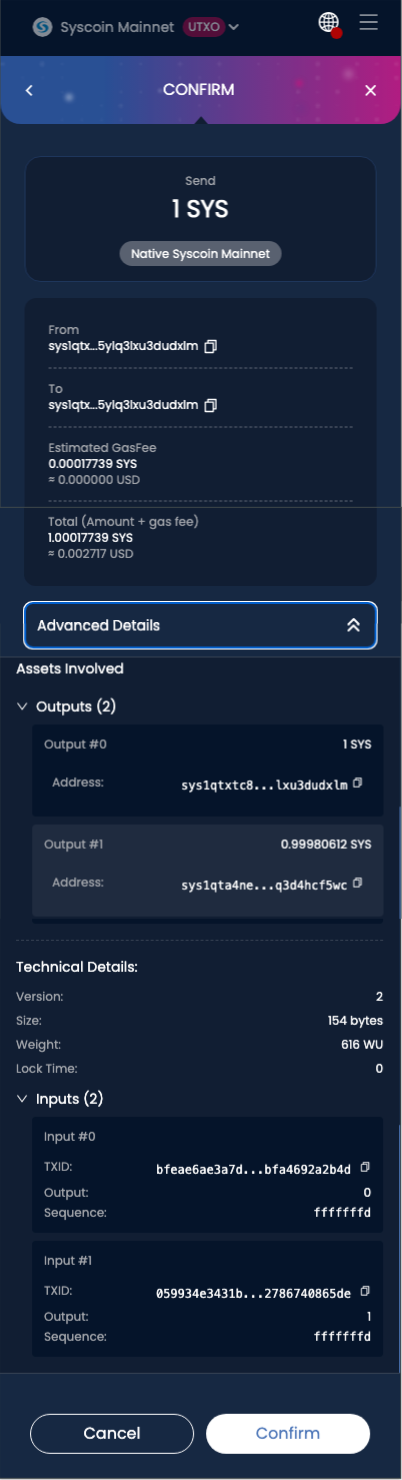
PSBT Sign Review
UTXO signing confirmation
Scroll inside the preview to inspect outputs, inputs, size, weight, and lock time.
const signed = await window.pali.request({
  method: 'sys_sign',
  params: [psbtBase64],
});
Sign and send
const txid = await window.pali.request({
  method: 'sys_signAndSend',
  params: [psbtBase64],
});
Fetch transactions
const transactions = await window.pali.request({
  method: 'sys_getTransactions',
});

const tx = await window.pali.request({
  method: 'sys_transaction',
  params: [txid],
});
Validate an address
const valid = await window.pali.request({
  method: 'sys_isValidSYSAddress',
  params: [address],
});
Dapp responsibility
Pali signs what the user approves. Your application is responsible for constructing sane PSBT inputs, outputs, fees, change, and asset metadata before requesting a signature.